









Complete Guide to Database Migrations with Spring Boot, PostgreSQL, and Flyway
September 2, 2026
Introduction
When building backend applications using relational databases like PostgreSQL, one of the biggest
challenges is safely evolving the database schema after real data already exists.
A very common beginner approach is:
spring.jpa.hibernate.ddl-auto=create
or:
spring.jpa.hibernate.ddl-auto=update
This may work during early development, but once your application contains real production data, automatic schema recreation becomes dangerous.
- What database migrations are
- Why migrations are important
- How Flyway works internally
- How to use Flyway with Spring Boot and PostgreSQL
- How migrations behave in production
- How teams work with migrations
- Safe database evolution strategies
- Real-world examples
1. What is a Database Migration?
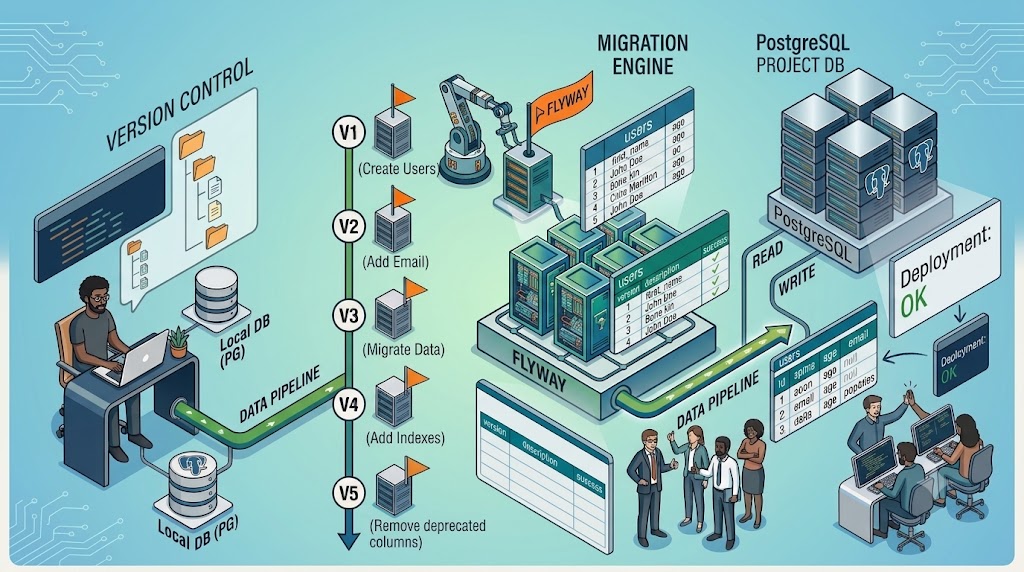
- A version-controlled database change that evolves the schema safely over time.
| Version | Purpose |
|---|---|
| V1 | Create users table |
| V2 | Add email column |
| V3 | Migrate existing data |
| V4 | Add indexes |
| V5 | Remove deprecated columns |
Instead of recreating the entire database, migrations apply only incremental changes.
2. Why Hibernate Auto-DDL is Dangerous
Using create:
spring.jpa.hibernate.ddl-auto=create
- Drops and recreates schema
- Deletes all existing data
- Unsafe for production
Using update:
spring.jpa.hibernate.ddl-auto=update
- Hibernate guesses schema changes automatically
- Unpredictable for complex relational structures
- No migration history
- No rollback tracking
- Unsafe for teams
3. Recommended Production Setup
Production systems usually use:
spring.jpa.hibernate.ddl-auto=validate
- Hibernate validates schema
- Flyway controls schema evolution
- Database changes become explicit and safe
4. How Flyway Works
Flyway works by:
- Reading migration files
- Checking migration history
- Running only missing migrations
- Recording execution status
5. Flyway Architecture
Spring Boot Application
↓
Flyway
↓
PostgreSQL Database
- connects to PostgreSQL,
- executes SQL files,
- tracks execution history.
6. The flyway_schema_history Table
Flyway automatically creates:
flyway_schema_history
- migration versions
- filenames
- checksums
- timestamps
- success/failure status
| Version | Description | Success |
|---|---|---|
| 1 | create users table | true |
| 2 | add email column | true |
| 3 | migrate existing data | true |
This table is very small and never becomes a storage issue.
7. Setting Up Flyway in Spring Boot
Maven Dependency:
<dependency>
<groupId>org.flywaydb</groupId>
<artifactId>flyway-core</artifactId>
</dependency>
Application Properties:
spring.datasource.url=jdbc:postgresql://localhost:5432/project_db
spring.datasource.username=postgres
spring.datasource.password=postgres
spring.jpa.hibernate.ddl-auto=validate
spring.flyway.enabled=true
8. Migration Folder Structure
Create folder:
src/main/resources/db/migration
Example files:
V1__create_users_table.sql
V2__add_email_column.sql
V3__migrate_existing_data.sql
9. Flyway Naming Rules
Correct format:
V<version>__<description>.sql
Examples:
V1__create_users.sql
V2__add_email.sql
V3__migrate_data.sql
Incorrect:
create_users.sql
migration1.sql
10. First Migration Example
V1__create_users_table.sql
CREATE TABLE users (
id BIGSERIAL PRIMARY KEY,
name VARCHAR(255),
age INT
);
11. Spring Boot Entity Example
@Entity
@Table(name = “users”)
public class User {
@Id
@GeneratedValue(strategy = GenerationType.IDENTITY)
private Long id;
private String name;
private Integer age;
}
12. Application Startup Process
- Connects to PostgreSQL
- Flyway checks flyway_schema_history
- Executes pending migrations
- Records migration status
- Hibernate validates schema
- Application starts
13. Real Migration Scenario
Suppose the application already contains:
| ID | Name | Age |
|---|---|---|
| 1 | John Doe | 25 |
- email column
14. Add New Column Safely
V2__add_email_column.sql
ALTER TABLE users
ADD COLUMN email VARCHAR(255);
Data remains safe.
Result:
| ID | Name | Age | |
|---|---|---|---|
| 1 | John Doe | 25 | null |
15. Data Migration Example
Suppose existing users need generated emails.
V3__migrate_existing_data.sql
UPDATE users
SET email =
LOWER(REPLACE(name, ‘ ‘, ‘.’))
|| ‘@example.com’
WHERE email IS NULL;
Result:
| ID | Name | |
|---|---|---|
| 1 | John Doe | john.doe@example.com |
16. First Production Deployment
Suppose production database is initially empty.
Flyway executes:
V1 -> create table
V2 -> add email column
V3 -> migrate data
Even if no rows exist:
UPDATE users SET ...
is still valid.
PostgreSQL simply updates:
0 rows
No failure occurs.
17. Important Migration Philosophy
Migrations represent: Complete database history.
A fresh environment can rebuild schema from version 1 to latest.
18. Why Old Migrations Must Never Be Deleted
Migration files are part of application history.
They are required for:
- new environments
- testing databases
- CI/CD pipelines
- production deployments
- new developers
Always commit migration files to Git.
19. Team Collaboration Example
Suppose multiple developers use same database.
Developer A creates:
V10__add_email.sql
Runs application.
Flyway records version 10 in:
flyway_schema_history
Developer B pulls latest code.
When Developer B starts application:
Flyway sees:
V10 already executed
Migration is skipped automatically.
20. Recommended Team Setup
Professional teams usually use:
Local Development
Each developer uses:
- separate local PostgreSQL database
Shared Environments
Separate:
- development
- staging
- QA
- production
21. Safe Database Evolution Strategy
Production-safe migrations follow:
Expand
→ Migrate Data
→ Switch Application
→ Remove Old Structure
22. Example: Splitting Name Column
Current schema:
| ID | Name |
|---|---|
| 1 | John Doe |
Business requires:
first_name
last_name
Step 1 — Expand Schema
ALTER TABLE users
ADD COLUMN first_name VARCHAR(100);
ALTER TABLE users
ADD COLUMN last_name VARCHAR(100);
Step 2 — Backfill Data
UPDATE users
SET
first_name = split_part(name, ‘ ‘, 1),
last_name = split_part(name, ‘ ‘, 2);
Step 3 — Update Application
Application now uses:
- first_name
- last_name
instead of:
- name
Step 4 — Remove Old Column
ALTER TABLE users
DROP COLUMN name;
No data loss occurs.
23. Safe Migration Principles
Prefer Additive Changes
Safer:
- add table
- add column
- add index
More dangerous:
- drop column
- rename column
- type conversion
Keep Migrations Small
GOOD:
V101 add email
V102 migrate email data
V103 add constraint
BAD:
One huge 5000-line migration
Never Modify Old Executed Migrations
BAD:
Editing:
V2__add_email.sql
after production execution.
GOOD:
Create:
V3__modify_email_constraints.sql
instead.
24. Large Project Scaling
Flyway works perfectly fine with:
- 150 tables
- 500 tables
- thousands of migrations
- millions of records
Flyway only executes pending migrations.
It does NOT recreate entire schema.
25. Common Beginner Misconception
Incorrect mindset:
Entity changes
→ recreate database
Correct professional mindset:
Entity changes
→ create migration
→ evolve schema safely
26. Production Deployment Flow
Typical deployment:
Deploy new application
↓
Flyway checks migration history
↓
Runs pending migrations
↓
Schema safely updated
↓
Application starts
No table recreation.
No data loss.
27. What Flyway Does Automatically
Flyway automatically:
- creates flyway_schema_history
- tracks migration versions
- executes migrations sequentially
- skips already executed migrations
- records success/failure
- validates checksums
28. What Developers Must Do Manually
Developers must:
- create migration files
- write SQL changes manually
- commit migrations to Git
- design safe schema evolution
Flyway does NOT automatically infer entity changes.
29. Recommended Learning Path
To master production-grade relational database evolution, learn:
PostgreSQL
- transactions
- indexes
- constraints
- locks
- execution plans
- concurrent indexes
Migration Engineering
- backward compatibility
- zero downtime deployments
- rolling deployments
- data backfills
- large-table migration strategies
30. Final Takeaway
The goal is NOT:
“How do I recreate my schema?”
The real engineering goal is:
“How do I evolve a live relational database safely?”
That mindset is one of the foundations of scalable backend engineering.
Get In Touch
"Share your ideas and get the best software service in the industry."



No comment